 Akos Kiss
257814d063
Akos Kiss
257814d063
That "libm" in the name of the library resulted in awkward naming
on *nix systems (`libjerry-libm.*`, "lib" occurring twice). And the
name of the corresponding header is `math.h` anyway.

Note that this is a breaking change in some sense. The commit
contains no API change, but the build system does change for users
of the math library.

JerryScript-DCO-1.0-Signed-off-by: Akos Kiss akiss@inf.u-szeged.hu
153 lines
3.6 KiB
Markdown
153 lines
3.6 KiB
Markdown
### About
|
|
|
|
This folder contains files to integrate JerryScript with Zephyr RTOS to
|
|
run on a number of supported boards (like
|
|
[Arduino 101 / Genuino 101](https://www.arduino.cc/en/Main/ArduinoBoard101),
|
|
[Zephyr Arduino 101](https://www.zephyrproject.org/doc/board/arduino_101.html)).
|
|
|
|
### How to build
|
|
|
|
#### 1. Preface
|
|
|
|
1. Directory structure
|
|
|
|
Assume `harmony` as the path to the projects to build.
|
|
The folder tree related would look like this.
|
|
|
|
```
|
|
harmony
|
|
+ jerryscript
|
|
| + targets
|
|
| + zephyr
|
|
+ zephyr-project
|
|
```
|
|
|
|
|
|
2. Target boards/emulations
|
|
|
|
Following Zephyr boards were tested: qemu_x86, qemu_cortex_m3, arduino_101,
|
|
frdm_k64f.
|
|
|
|
|
|
#### 2. Prepare Zephyr
|
|
|
|
Follow [this](https://www.zephyrproject.org/doc/getting_started/getting_started.html) page to get
|
|
the Zephyr source and configure the environment.
|
|
|
|
If you just start with Zephyr, you may want to follow "Building a Sample
|
|
Application" section in the doc above and check that you can flash your
|
|
target board.
|
|
|
|
Remember to source the Zephyr environment as explained in the zephyr documenation:
|
|
|
|
```
|
|
cd zephyr-project
|
|
source zephyr-env.sh
|
|
|
|
export ZEPHYR_GCC_VARIANT=zephyr
|
|
export ZEPHYR_SDK_INSTALL_DIR=<sdk installation directory>
|
|
```
|
|
|
|
#### 3. Build JerryScript for Zephyr
|
|
|
|
The easiest way is to build and run on a QEMU emulator:
|
|
|
|
For x86 architecture:
|
|
|
|
```
|
|
make -f ./targets/zephyr/Makefile.zephyr BOARD=qemu_x86 run
|
|
```
|
|
|
|
For ARM (Cortex-M) architecture:
|
|
|
|
```
|
|
make -f ./targets/zephyr/Makefile.zephyr BOARD=qemu_cortex_m3 run
|
|
```
|
|
|
|
#### 4. Build for Arduino 101
|
|
|
|
```
|
|
# assume you are in harmony folder
|
|
cd jerryscript
|
|
make -f ./targets/zephyr/Makefile.zephyr BOARD=arduino_101
|
|
```
|
|
|
|
This will generate the following libraries:
|
|
```
|
|
./build/arduino_101/librelease-cp_minimal.jerry-core.a
|
|
./build/arduino_101/librelease-cp_minimal.jerry-math.lib.a
|
|
./build/arduino_101/librelease.external-cp_minimal-entry.a
|
|
```
|
|
|
|
The final Zephyr image will be located here:
|
|
```
|
|
./build/arduino_101/zephyr/zephyr.strip
|
|
```
|
|
|
|
#### 5. Flashing
|
|
|
|
Details on how to flash the image can be found here:
|
|
[Flashing image](https://www.zephyrproject.org/doc/board/arduino_101.html)
|
|
(or similar page for other supported boards).
|
|
|
|
To be able to use this demo in hardware you will need the serial console
|
|
which will be generating output to Pins 0 & 1.
|
|
|
|
You will need a 3.3v TTL to RS232, please follow the zephyr documentation on it.
|
|
|
|
Some examples of building the software
|
|
|
|
```
|
|
make -f ./targets/zephyr/Makefile.zephyr BOARD=<board> clean
|
|
```
|
|
|
|
- Not using a Jtag and having a factory stock Arduino 101.
|
|
You can follow the Zephyr instructions to flash using the dfu-util command
|
|
or use this helper:
|
|
|
|
```
|
|
make -f ./targets/zephyr/Makefile.zephyr BOARD=arduino_101 dfu-x86
|
|
```
|
|
|
|
Make sure you have the factory bootloader in your device to use this method or it will not flash.
|
|
|
|
- Using JTAG
|
|
|
|
There is a helper function to flash using the JTAG and Flywatter2
|
|
|
|
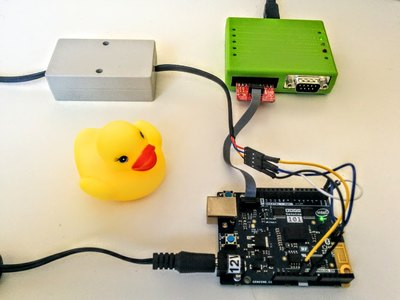
|
|
|
|
```
|
|
make -f ./targets/zephyr/Makefile.zephyr BOARD=arduino_101 flash
|
|
```
|
|
|
|
<warning> Careful if you flash the BOARD arduino_101, you will lose the bootloader
|
|
and you will have to follow the zephyr documentation to get it back from
|
|
the backup we all know you did at the setup. </warning>
|
|
|
|
#### 6. Serial terminal
|
|
|
|
Test command line in a serial terminal.
|
|
|
|
|
|
You should see something similar to this:
|
|
```
|
|
JerryScript build: Aug 12 2016 17:12:55
|
|
JerryScript API 1.0
|
|
Zephyr version 1.4.0
|
|
js>
|
|
```
|
|
|
|
|
|
Run the example javascript command test function
|
|
```
|
|
js> var test=0; for (t=100; t<1000; t++) test+=t; print ('Hi JS World! '+test);
|
|
Hi JS World! 494550
|
|
```
|
|
|
|
|
|
Try a more complex function:
|
|
```
|
|
js> function hello(t) {t=t*10;return t}; print("result"+hello(10.5));
|
|
```
|