 Sergio Martinez
7583b63a6e
Sergio Martinez
7583b63a6e
This patch contains a project in which you can run
a small js test inside the Arduino101.

Follows the Nuttx implementation to replicate a command
line in the Quark SE Lakemont architecture.

Everything is self contained in the targets/arduino_101 folder.
It has only been tested with the arduino 101 at the moment.

Check the README.md for a more detailed explanation of
how to compile and run it.

- Command line javascript run test.

Use test to get a default test.

Write any valid javascript in the shell and get it resolved and executed

- Support for qemu
- Added extra verbose mode on the demo function
- Support to build factory images that can be flashed with dfu-util
- Added a few extra examples on the README about commands that work.

Small fixes to readme and libc_support.c (#1)

- Added a few more instructions to the README.md for arduino_101
- Added the stdint.h include in libc_support.c
- Added parameter to check-vera.sh to check a specific folder
- Cleared the libc function duplication

JerryScript-DCO-1.0-Signed-off-by: Sergio Martinez sergio.martinez.rodriguez@intel.com
140 lines
2.9 KiB
Markdown
140 lines
2.9 KiB
Markdown
### About
|
|
|
|
This folder contains files to run JerryScript on Zephyr with
|
|
[Arduino 101 / Genuino 101](https://www.arduino.cc/en/Main/ArduinoBoard101)
|
|
|
|
Zephyr project arduino 101
|
|
[Zephyr Arduino 101](https://www.zephyrproject.org/doc/board/arduino_101.html)
|
|
|
|
### How to build
|
|
|
|
#### 1. Preface
|
|
|
|
1, Directory structure
|
|
|
|
Assume `harmony` as the path to the projects to build.
|
|
The folder tree related would look like this.
|
|
|
|
```
|
|
harmony
|
|
+ jerry
|
|
| + targets
|
|
| + arduino_101
|
|
+ zephyr
|
|
```
|
|
|
|
|
|
2, Target board
|
|
|
|
Assume [Arduino 101 / Genuino 101](https://www.arduino.cc/en/Main/ArduinoBoard101)
|
|
as the target board.
|
|
|
|
|
|
#### 2. Prepare Zephyr
|
|
|
|
Follow [this](https://www.zephyrproject.org/doc/getting_started/getting_started.html) page to get
|
|
the Zephyr source and configure the environment.
|
|
|
|
Follow "Building a Sample Application" and check that you can flash the Arduino 101
|
|
|
|
Remember to source the zephyr environment.
|
|
|
|
```
|
|
source zephyr-env.sh
|
|
|
|
export ZEPHYR_GCC_VARIANT=zephyr
|
|
|
|
export ZEPHYR_SDK_INSTALL_DIR=<sdk installation directory>
|
|
```
|
|
|
|
#### 3. Build JerryScript for Zephyr
|
|
|
|
```
|
|
# assume you are in harmony folder
|
|
cd jerry
|
|
make -f ./targets/arduino_101/Makefile.arduino_101
|
|
```
|
|
|
|
This will generate the following libraries:
|
|
```
|
|
./build/arduino_101/librelease-cp_minimal.jerry-core.a
|
|
./build/arduino_101/librelease-cp_minimal.jerry-libm.lib.a
|
|
./build/arduino_101/librelease.external-cp_minimal-entry.a
|
|
```
|
|
|
|
The final Zephyr image will be located here:
|
|
```
|
|
./build/arduino_101/zephyr/zephyr.strip
|
|
```
|
|
|
|
#### 5. Flashing
|
|
|
|
Details on how to flash the image can be found here:
|
|
[Flashing image](https://www.zephyrproject.org/doc/board/arduino_101.html)
|
|
|
|
To be able to use this demo in hardware you will need the serial console
|
|
which will be generating output to Pins 0 & 1
|
|
|
|
Some examples of building the software
|
|
|
|
```
|
|
make -f ./targets/arduino_101/Makefile.arduino_101 clean
|
|
```
|
|
|
|
- Not using a Jtag and having a factory stock Arduino 101.
|
|
|
|
```
|
|
make -f ./targets/arduino_101/Makefile.arduino_101 BOARD=arduino_101_factory
|
|
```
|
|
|
|
Follow the Zephyr instructions to flash using the dfu-util command.
|
|
|
|
|
|
- Using JTAG
|
|
|
|
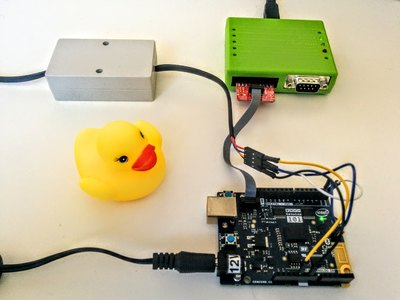
There is a helper function to flash using the JTAG and Flywatter2
|
|
|
|
|
|
```
|
|
make -f ./targets/arduino_101/Makefile.arduino_101 BOARD=arduino_101 flash
|
|
|
|
```
|
|
|
|
- Compiling and running with the emulator
|
|
```
|
|
make -f ./targets/arduino_101/Makefile.arduino_101 BOARD=qemu_x86 qemu
|
|
```
|
|
|
|
|
|
#### 6. Serial terminal
|
|
|
|
Test command line in a serial terminal.
|
|
|
|
|
|
You should see something similar to this:
|
|
```
|
|
Jerry Compilation May 26 2016 13:37:50
|
|
js>
|
|
```
|
|
|
|
|
|
Run the example javascript command test function
|
|
```
|
|
js> test
|
|
Script [var test=0; for (t=100; t<1000; t++) test+=t; print ('Hi JS World! '+test);]
|
|
Hi JS World! 494550
|
|
```
|
|
|
|
|
|
Try more complex functions:
|
|
```
|
|
js>function hello(t){t=t*10;return t}; print("result"+hello(10.5));
|
|
```
|
|
|
|
|
|
Help will provide a list of commands
|
|
```
|
|
> help
|
|
```
|
|
|
|
This program, is built in top of the Zephyr command line, so there is a limit of 10 spaces. |