 Sergio Martinez
7583b63a6e
Sergio Martinez
7583b63a6e
This patch contains a project in which you can run
a small js test inside the Arduino101.

Follows the Nuttx implementation to replicate a command
line in the Quark SE Lakemont architecture.

Everything is self contained in the targets/arduino_101 folder.
It has only been tested with the arduino 101 at the moment.

Check the README.md for a more detailed explanation of
how to compile and run it.

- Command line javascript run test.

Use test to get a default test.

Write any valid javascript in the shell and get it resolved and executed

- Support for qemu
- Added extra verbose mode on the demo function
- Support to build factory images that can be flashed with dfu-util
- Added a few extra examples on the README about commands that work.

Small fixes to readme and libc_support.c (#1)

- Added a few more instructions to the README.md for arduino_101
- Added the stdint.h include in libc_support.c
- Added parameter to check-vera.sh to check a specific folder
- Cleared the libc function duplication

JerryScript-DCO-1.0-Signed-off-by: Sergio Martinez [email protected]
About
This folder contains files to run JerryScript on Zephyr with Arduino 101 / Genuino 101
Zephyr project arduino 101 Zephyr Arduino 101
How to build
1. Preface
1, Directory structure
Assume harmony as the path to the projects to build.
The folder tree related would look like this.
harmony
  + jerry
  |  + targets
  |      + arduino_101
  + zephyr
2, Target board
Assume Arduino 101 / Genuino 101 as the target board.
2. Prepare Zephyr
Follow this page to get the Zephyr source and configure the environment.
Follow "Building a Sample Application" and check that you can flash the Arduino 101
Remember to source the zephyr environment.
source zephyr-env.sh

export ZEPHYR_GCC_VARIANT=zephyr

export ZEPHYR_SDK_INSTALL_DIR=<sdk installation directory>
3. Build JerryScript for Zephyr
# assume you are in harmony folder
cd jerry
make -f ./targets/arduino_101/Makefile.arduino_101
This will generate the following libraries:
./build/arduino_101/librelease-cp_minimal.jerry-core.a
./build/arduino_101/librelease-cp_minimal.jerry-libm.lib.a
./build/arduino_101/librelease.external-cp_minimal-entry.a
The final Zephyr image will be located here:
./build/arduino_101/zephyr/zephyr.strip
5. Flashing
Details on how to flash the image can be found here: Flashing image
To be able to use this demo in hardware you will need the serial console which will be generating output to Pins 0 & 1
Some examples of building the software
make -f ./targets/arduino_101/Makefile.arduino_101 clean
- Not using a Jtag and having a factory stock Arduino 101.
make -f ./targets/arduino_101/Makefile.arduino_101 BOARD=arduino_101_factory
Follow the Zephyr instructions to flash using the dfu-util command.
- Using JTAG
There is a helper function to flash using the JTAG and Flywatter2
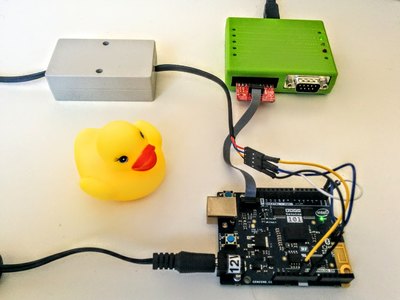
make -f ./targets/arduino_101/Makefile.arduino_101 BOARD=arduino_101 flash
- Compiling and running with the emulator
make -f ./targets/arduino_101/Makefile.arduino_101 BOARD=qemu_x86 qemu
6. Serial terminal
Test command line in a serial terminal.
You should see something similar to this:
Jerry Compilation May 26 2016 13:37:50
js>
Run the example javascript command test function
js> test
Script [var test=0; for (t=100; t<1000; t++) test+=t; print ('Hi JS World! '+test);]
Hi JS World! 494550
Try more complex functions:
js>function hello(t){t=t*10;return t}; print("result"+hello(10.5));
Help will provide a list of commands
> help
This program, is built in top of the Zephyr command line, so there is a limit of 10 spaces.