 Akos Kiss
36479ddc1a
Akos Kiss
36479ddc1a
The 'external' toolchain file does nothing but transitively sets
some cmake system variables from values received on the command
line, and forcibly sets the C compiler. However, the same cmake
system variables can be directly set via the command line, together
with the C compiler, and specifying a toolchain is not a must.
Thus, this patch drops the superfluous 'external' toolchain file
and updates cmake-based targets to invoke cmake in a simpler form.

Related changes in this commit:
- While updating the cmake invocations, all the command line
  arguments have been reviewed and simplified (removed those, which
  did not change the defaults).
- Removed unnecessary forced C compiler settings from some
  toolchain files (and/or changed them to setting the "compiler
  works" flag to true, thus keeping cmake's compiler identification
  logic but disabling some of its overzealous compiler sanity
  checks).

JerryScript-DCO-1.0-Signed-off-by: Akos Kiss [email protected]
About
This folder contains files to integrate JerryScript with Zephyr RTOS to run on a number of supported boards (like Arduino 101 / Genuino 101, Zephyr Arduino 101).
How to build
1. Preface
- Directory structure
Assume harmony as the path to the projects to build.
The folder tree related would look like this.
harmony
  + jerryscript
  |  + targets
  |      + zephyr
  + zephyr-project
- Target boards/emulations
Following Zephyr boards were tested: qemu_x86, qemu_cortex_m3, arduino_101, frdm_k64f.
2. Prepare Zephyr
Follow this page to get the Zephyr source and configure the environment.
If you just start with Zephyr, you may want to follow "Building a Sample Application" section in the doc above and check that you can flash your target board.
Remember to source the Zephyr environment as explained in the zephyr documenation:
cd zephyr-project
source zephyr-env.sh

export ZEPHYR_GCC_VARIANT=zephyr
export ZEPHYR_SDK_INSTALL_DIR=<sdk installation directory>
3. Build JerryScript for Zephyr
The easiest way is to build and run on a QEMU emulator:
For x86 architecture:
make -f ./targets/zephyr/Makefile.zephyr BOARD=qemu_x86 qemu
For ARM (Cortex-M) architecture:
make -f ./targets/zephyr/Makefile.zephyr BOARD=qemu_cortex_m3 qemu
4. Build for Arduino 101
# assume you are in harmony folder
cd jerryscript
make -f ./targets/zephyr/Makefile.zephyr BOARD=arduino_101
This will generate the following libraries:
./build/arduino_101/librelease-cp_minimal.jerry-core.a
./build/arduino_101/librelease-cp_minimal.jerry-libm.lib.a
./build/arduino_101/librelease.external-cp_minimal-entry.a
The final Zephyr image will be located here:
./build/arduino_101/zephyr/zephyr.strip
5. Flashing
Details on how to flash the image can be found here: Flashing image (or similar page for other supported boards).
To be able to use this demo in hardware you will need the serial console which will be generating output to Pins 0 & 1.
You will need a 3.3v TTL to RS232, please follow the zephyr documentation on it.
Some examples of building the software
make -f ./targets/zephyr/Makefile.zephyr BOARD=<board> clean
- Not using a Jtag and having a factory stock Arduino 101. You can follow the Zephyr instructions to flash using the dfu-util command or use this helper:
make -f ./targets/zephyr/Makefile.zephyr BOARD=arduino_101 dfu-x86
Make sure you have the factory bootloader in your device to use this method or it will not flash.
- Using JTAG
There is a helper function to flash using the JTAG and Flywatter2
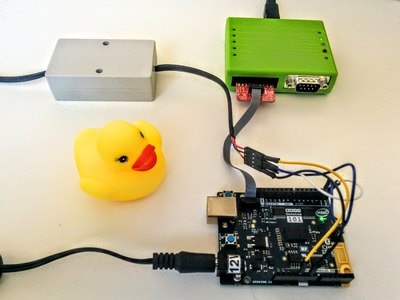
make -f ./targets/zephyr/Makefile.zephyr BOARD=arduino_101 flash
Careful if you flash the BOARD arduino_101, you will lose the bootloader and you will have to follow the zephyr documentation to get it back from the backup we all know you did at the setup.
6. Serial terminal
Test command line in a serial terminal.
You should see something similar to this:
JerryScript build: Aug 12 2016 17:12:55
JerryScript API 1.0
Zephyr version 1.4.0
js>
Run the example javascript command test function
js> var test=0; for (t=100; t<1000; t++) test+=t; print ('Hi JS World! '+test);
Hi JS World! 494550
Try a more complex function:
js> function hello(t) {t=t*10;return t}; print("result"+hello(10.5));